TM Tacho Manager Modules · Help · Demo
Core · always free

Find every infringement before the inspector does

Tacho Manager reads driver-card and vehicle-unit files, checks driving, breaks and rests against EU Regulation 561/2006 and working time against Directive 2002/15/EC, and shows each finding with the rule, the day and the measured value. Rest planner, reports, documents and reminders are in the free core.

Company account Driver account

Company accounts use it for every driver and vehicle in the fleet; driver accounts see the same reports for their own card, and their uploads reach the companies they are linked to.

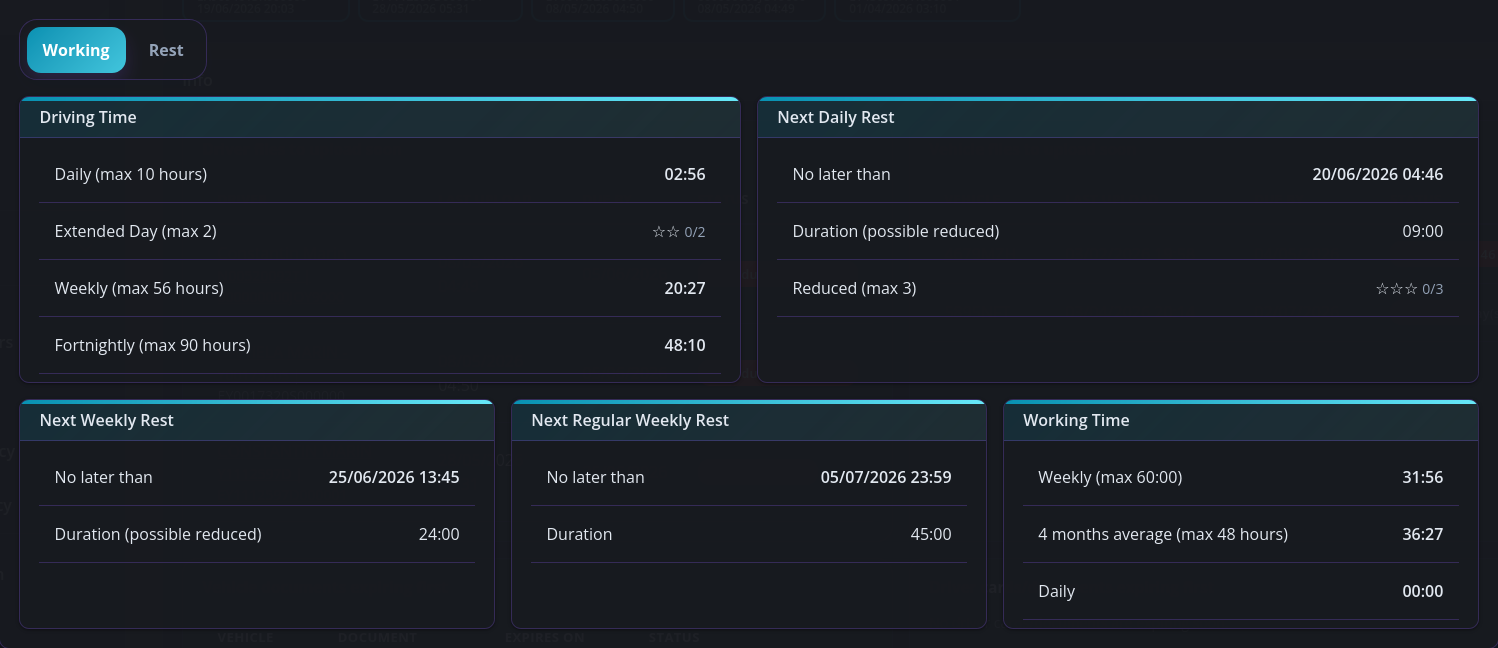
Rest planner: driving time, next daily and weekly rest, working time.

Why it matters

Every rule, on every upload

Driving time, breaks, daily and weekly rests, reduced-rest compensation and the optional working-time checks are analysed on each file. Each finding carries a severity, the rule, the period and the measured value next to the legal limit.

A rest planner for tonight

From the newest file the planner shows driving and working time used today, this week and this fortnight, extended days and reduced rests left, when the next daily and weekly rest must start, and the earliest possible end times of the current rest.

An encrypted archive that fills itself

Upload several .ddd or .tgd files at once, from the office or from a driver's phone with a card reader. Files are stored encrypted, identical files are recognised, and a driver's upload is copied to every company the driver is linked to.

Reminders before anything lapses

Card and document expiries, overdue driver and vehicle downloads and new infringements appear as reminders, each with its own lead time and optional push notification. The Info page lists what is due first.

Vehicle-unit reports too

For each truck the vehicle file gives an all-data overview, a speed report, over-speeding events, faults and events and daily activities. The next calibration date is read from the file and saved as a vehicle document with its own reminder.

Documents with the scans attached

Driver documents such as licence, CAP or medical certificate keep an expiry date and up to two photos; vehicle documents such as insurance or MOT keep any number of JPG, PNG, WEBP or PDF scans, previewed full-screen.
How it works

1

Upload the files

Open a driver or truck and click Upload for one or several .ddd or .tgd files, or use Tools → Bulk upload for a whole folder: each file is detected and matched to the right driver or truck. Drivers can upload from the Android app with a card reader.

2

Pick a report

Click a filename and choose Infringements, Activities, Rest planning or Work summary. Infringements open on the last 56 days with a day strip, a 24-hour timeline and the findings table; quick buttons switch to 7, 30, 60 or 90 days or the whole file.

3

Read the finding

Each row shows the severity, the rule in plain language, the period and the measured value next to the legal limit. Click it to jump to that day on the timeline, with places, card insertions and GNSS positions on a map.

4

Plan and prevent

Open Rest planning to see how much driving and working time is left and when the next rest is due. The Info page keeps the company view: infringements per driver over the last 56 days, files due, cards and documents expiring first.

In detail

Rules analysed

Article 6 daily, weekly and fortnightly driving; Article 7 breaks including the 15+30 split; Article 8 daily, split and weekly rests, consecutive reduced rests, the six 24-hour periods rule and compensation. Severity follows Directive 2006/22/EC Annex III.

Settings that change the analysis

Settings → Legal & report settings enables the Directive 2002/15/EC checks (6-hour break, 60-hour week, 48-hour four-month average, 10-hour night work), sets the national night window and the passenger-transport and 2020/1054 derogation options.

Work summary and activities

Work summary totals driving, other work, availability and rest, total work, tracked time and kilometres, with kilometres per vehicle. Activities group each day with its totals and a colour-coded timeline.

Company dashboard

The Info page lists infringements per driver over the last 56 days with the change against the previous count, the last infringement, driver and vehicle files due, and cards and documents expiring first. Summaries refresh in the background after uploads.

Downloads and tools

Every file can be downloaded, or a date range zipped per driver, per vehicle or for the whole account under Tools. Tools also converts filenames between .DDD and .TGD and offers a trip cost calculator.

Vehicle files

Trucks and trailers each keep documents with scans; trucks also hold vehicle-unit files and reports, a free-text log of work and notes, and a files-due status based on the 90-day download period.

Questions

Which files can I upload?

Driver-card and vehicle-unit downloads in .ddd or .tgd format from Gen1 and Gen2 smart tachographs, up to 50 MB each and several at once. Files are stored encrypted and a file identical to one already stored is recognised.

Does this guarantee I pass an inspection?

No. Tacho Manager analyses and reports against EU Regulation 561/2006 and Directive 2002/15/EC from the data recorded on the card. It explains each finding so you can act early; the assessment at an inspection remains with the authorities.

Can a driver account use this?

Yes. A driver account uploads its own card, sees the same infringement, activity, rest-planning and work-summary reports, keeps its documents with photos and gets card, document and download reminders. Linking to a company with an invitation code copies the uploads there.

Is it really free?

Yes. Uploads, infringements, rest planner, reports, drivers, vehicles, documents, reminders and tools are the free core. Payroll, Work orders & e-CMR, GPS tracking, Fuel tickets, Time registry and Calendar are modules, included for 30 days in new company accounts.

Can I check a file without an account?

Yes. The file inspector lets you upload a single driver-card or vehicle-unit file, pick a report and read it on the spot. No login is needed and nothing is stored.

Other modules

See it with real data

The full product is open as a read-only demo with realistic data. Then create your free account and upload your first card in under a minute.